Real estate agent listing approval
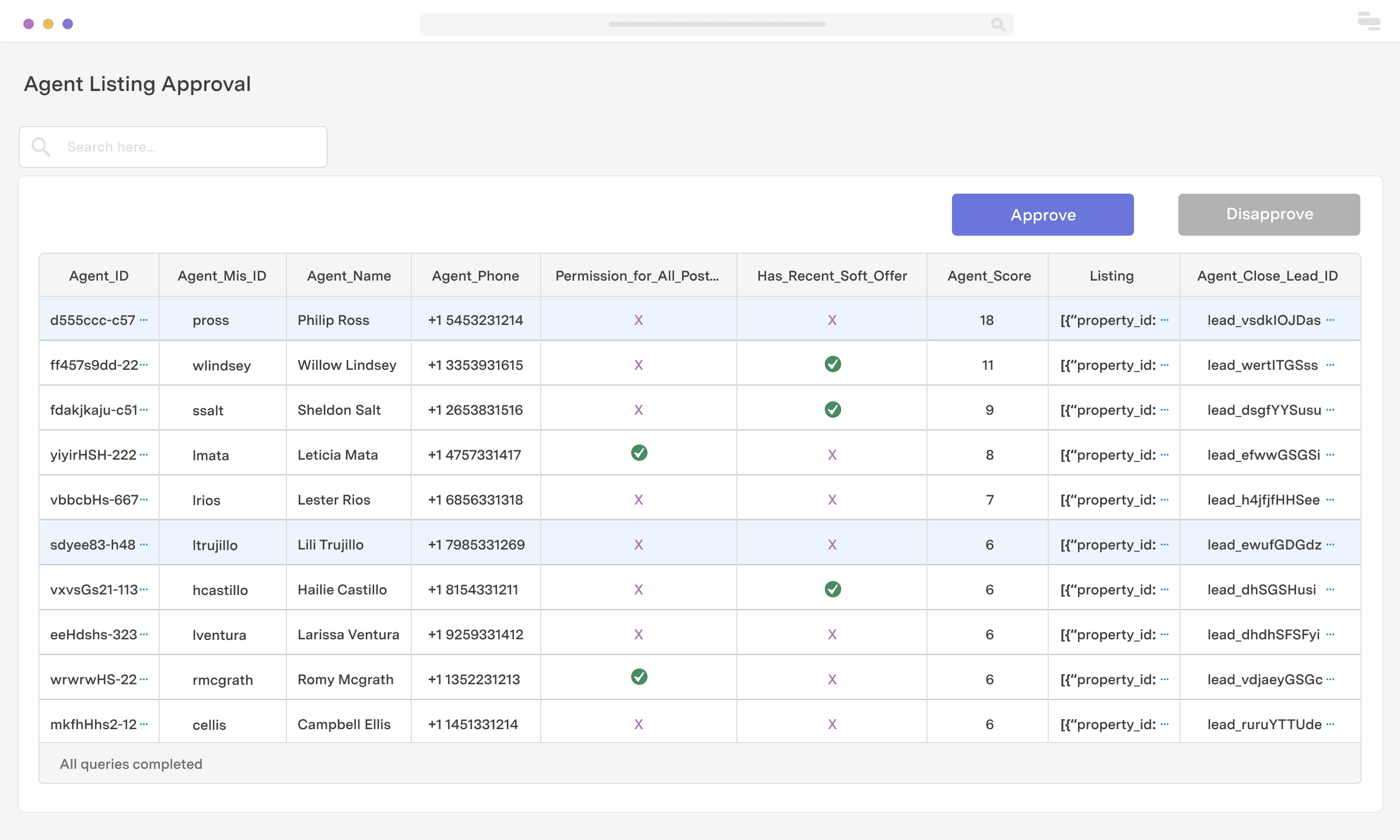
With Retool, you can easily build a dashboard for approving applications. In this example, we’re showing an application manager to approve real estate agents for the Multiple Listing Service (MLS). It’s powered by a PostgreSQL database that stores applicant information. Agent information is displayed in a table, where a team member can view information required for approval like agent score, number of listings, and agent MLS id. From there, they can select an applicant and approve or deny their application.
Industry
End users
Components


Components
Build from a handful of drag-and-drop components
Data source
To create this app, you'll need to connect to a database. Relational databases like PostgreSQL, DynamoDB, and MySQL are most common for use cases like this. Retool connects with dozens of data sources and APIs out of the box.
 1. Create resource
 2. Read data
 3. Connect data with UI
From startups to Fortune 500s, the world's most effective teams use Retool to build custom business software. Our customers







“I tell every technology leader I talk to that they should look at Retool as a way to reduce the burden of building admin UIs and democratize that kind of stuff across their company.
I tell every technology leader I talk to that they should look at Retool as a way to reduce the burden of building admin UIs and democratize that kind of stuff across their company.
Dean McRobie
CTO at CommonBond
Supercharge your business today.
Start building an internal tool or customer portal in under 10 minutes.